Own & Maintain · by ShopProp
You own it. Now keep its whole story.
Closing documents, receipts, manuals, repairs, and the improvements that raise your home's value — one record, kept for as long as you own it, and ready for the day you sell. And Robl, your home assistant, gets the work done: it finds the contractors, sends the requests, books the visits and reads the bids.
Upload or forward closing docs — free ShopProp client? Open from your dashboard
Or send them to your home's private email once the record exists. See a sample · Sign in

Watch it in 30 seconds
With sound. One invoice, filed. The tax basis builds itself.
How it works
Start your home’s record
Create it free in under a minute. A ShopProp client? Yours is waiting behind the Own & Maintain door on your dashboard — already carrying your closing details.
→ One home for everything about your home.
Add anything, any way
Drag in receipts, snap a photo, or just forward the email to ownandmaintain@shopprop.com — it files under your home. Your home also gets its own private address: hand it to your contractor, or CC it on any email about your home, and bids and invoices file themselves (message included — your evidence file for disputes and quotes).
→ The shoebox and the inbox, finally emptied.
AI files it for you
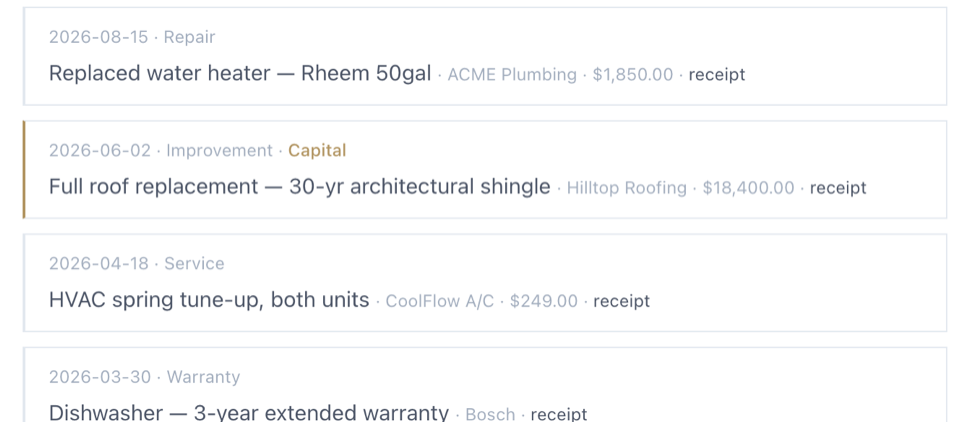
Upload a contractor invoice and Own & Maintain reads it — who did the work, what it was, when, and how much — then drafts the ledger entry. You confirm it; nothing counts until you do.
→ A real maintenance history, without the typing.
Watch your tax basis build
Confirmed capital improvements stack on top of your purchase price, each with its receipt attached. At tax time or at sale, one click hands your CPA the whole schedule.
→ Money back when you sell — because you can prove it.
Say what needs doing. Robl handles it.
Tell Robl, your home assistant, in your own words — “the water heater is out”, “get me bids on a new roof”. It finds contractors near you, writes the request and sends it as your assistant, books the estimate visits onto your calendar, reads the bids side by side with what the job usually costs, follows up until there is an answer, and tells the ones you did not pick. You read every letter before it goes; the money and the final say stay yours.
→ The work gets done without you chasing anyone.
Robl, your home assistant
Diane needs a plumber. Robl gets it done.
She says what is broken. Robl finds three plumbers near her, writes the request from the home's record and sends it as her assistant, signed “Robl · Diane's home assistant at Own & Maintain”. For a bigger job it asks each one to come and look, books the three visits onto her calendar, confirms the day before, and asks afterwards whether they came.
The bids come back to the home's own address and are read side by side — price, what it includes, when they can start, the warranty — next to what the job usually costs nearby. Diane picks one; Robl tells the others, politely. Nothing is chosen for her, nothing is paid for her, and every letter is on her list before it goes.
In between, Robl keeps the house: the filter, the gutters, the alarms, on their cadence, booked when she says so. A tenant's “the sink is leaking” rings her doorbell by email and becomes a job. And everything Robl did is one list she can read.
And the plan is the house's own. The inspection report and the seller's disclosure come with the home at closing; Robl reads them once and writes down what the house is made of and how old each part is, and what the inspector flagged — safety first, then repairs, then what to have looked at — each with its page, each a tap from booked.
Sending for you is rolling out home by home, and is your own switch on every home. Texting and calling the contractor are next.
"Why not just ask AI?"
AI can read a receipt. It can't keep one.
Paste a receipt into a chatbot and you get a good answer — that vanishes. Seven years from now, at the closing table or across from an auditor, an answer is worth nothing. The receipt is worth thousands.
Own & Maintain is the part AI alone can't be: the permanent record. Original documents attached to entries you confirmed, totals that build across years of ownership, a capital-improvements schedule your CPA can actually use, and a documented history you can hand a buyer.
Here, the AI is the clerk — it reads, files, and suggests. The record is what you're keeping.
Landlords
A rental keeps a different set of books. Same record.
Flip any home to a rental and it gains a tenancy: the tenant, the lease on file, the deposit, and a month-by-month rent ledger. Mark rent received with a tap — or email "received rent for October" and it lands on the right month for you to confirm.
Your tenant gets their own door: the maintenance history, the warranties, their lease, and their rent ledger — never your prices, your tax basis, or your closing papers. Repair requests and receipts they email file straight into the record; a repair they report rings your doorbell by email and becomes a job for Robl. Own several? Every rental sits beside your own home in one account.
Finding the tenant is the other half. Show & Lease, by ShopProp, handles the listing, showings, applications, and the signed lease — then the home carries on here.
Ready for the day you sell
The home with the documented history is the home that wins.
Share a scoped view with your CPA, a contractor, or a buyer — each link shows only what you choose, expires on its own, and can be turned off any time. And the whole record exports as one archive that opens forever: no internet, no account, no us. It is yours.
Our promise: you can export everything and delete everything — completely, immediately, anytime. Your home's story is never our hostage.
Own & Maintain
Start with the receipt on your counter.
Upload your closing docs — free
ShopProp client? Open it from your dashboard — your home is already there.